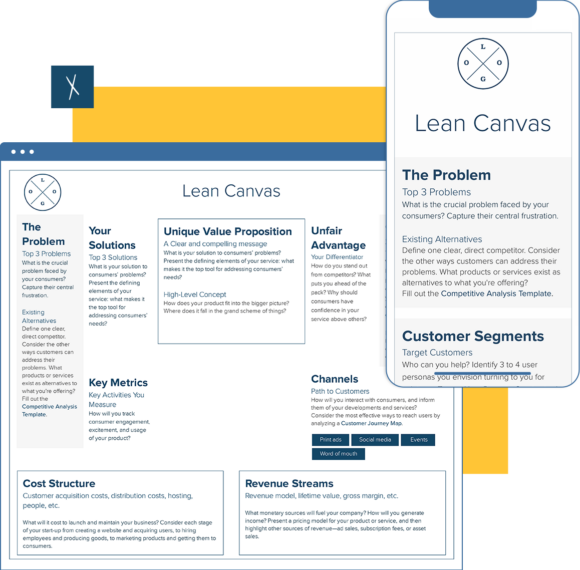
Lean Canvas Template
Geared toward entrepreneurs, the lean canvas template asks all the right questions to guide your team through the process of uncovering your startup’s unique value proposition. In 9 compact cells, the lean canvas tool asks you the vital questions to help you form a real business case for your grand vision.
- Map out the key foundations of your business idea.
- Identify your competitive advantage to generate a blueprint for your target consumer.
- Maintain the focus of real-life operations on your unique value proposition and communicate that value with your key partners and stakeholders.
Xtensio is your team’s deliverables workspace.
Create, collaborate, and deliver client-ready docs—then keep them current.
Join 411,389 using Xtensio.
Xtensio is the workspace for professional deliverables.
Make one deliverable today—then build a repeatable system for every client and project.
This is where teams create, collaborate, organize, and deliver the documents that run their work.
Everything stays on-brand, current, and ready to share.

Organize every deliverable
Keep strategy, sales, marketing, and client docs together by workspace.
Create fast, stay consistent
Start from 200+ templates or AI drafts, then apply your brand kit.
Collaborate in the doc
No more “final_v7.pdf” loop.
Standardize across deliverables
Apply your brand kit + reusable modules so every deliverable matches.
Improve what you send
See engagement, iterate, and reuse what works across projects.
Example lean canvas templates
How to create a lean canvas with Xtensio
- Create a free account and start editing, no credit card required.
Follow along with the instructional landing page details. Add charts, graphs, images, and videos to customize the landing page template and make it your own. Drag & drop. Resize. It’s the easiest editor ever.
- Customize everything in the lean canvas template to match your brand.
Define your style guide. Add your (or your client’s) brand fonts and colors. You can even pull colors directly from a website to easily brand your lean canvas and more.
- Work on your lean canvas business plan together on the cloud.
Add colleagues (or clients) to collaborate on the lean canvas template. Changes automatically save and sync across all devices, in real-time.
- Share a link. Present a slideshow. Embed. Download a PDF/PNG.
The lean canvas seamlessly adapts to your workflow. No more jumping from tool-to-tool to design different types of deliverables.
- Reuse and repurpose.
Save your own custom lean canvas template. Or copy and merge into other documents.

What is the lean canvas template?
The lean startup canvas, inspired by the Lean Startup movement, was originally created by LEANSTACK to generate simple and sleek representations of business operations. Before launching a product, use this version of the business model canvas template to present your startup’s unique solutions and market competitiveness to key partners.
How do you make a concise lean canvas?
The lean business plan is divided into 9 compact cells that pose critical questions to assist you in developing a real business case for your grand vision.
- Identify 3 real pain points.
- Research existing alternatives.
- Present your solution as a solution.
- Define your key metrics.
- Create a clear and compelling unique value proposition.
- Uncover your differentiating factor.
- Identify your target customer.
- Define the key channels you’ll reach these customers on.
- Outline your cost structure.
- Present a path for revenue streams.
Design, manage and share beautiful living documents… easily, together. Explore Xtensio
- Click and edit anything… together.
- Customize to match your branding.
- Share with a link, present, embed or download.
Related to the Lean Canvas Template
Fully customizable templates that you can make your own.


The 9 Boxes of the Lean Canvas Explained
Each box in the lean canvas captures a specific dimension of your business hypothesis. Understanding what belongs in each box — and more importantly, what does not — determines how useful the exercise is.
1. Problem
List the top one to three problems your target customers face. These should be problems they currently have, not problems they would have if your product existed. The key test: are customers already spending money or time solving this problem with an imperfect alternative? If they are not, the problem may not be painful enough to drive adoption. Document existing alternatives — how customers solve the problem today — because your true competition is not just other startups, it is spreadsheets, manual processes, and workarounds.
2. Solution
Keep the solution box deliberately brief at the canvas stage. You do not know yet what the right solution is — you only know what you plan to test. List the three features or capabilities that directly address the problems you have identified. Ash Maurya, who developed the lean canvas, recommends leaving this box until last, after you have validated the problem, to avoid falling in love with a solution before confirming the problem is real.
3. Unique Value Proposition
The UVP is a single clear statement of why your product is different and worth buying. It is not your tagline and it is not a feature list. A good UVP names the customer, the outcome, and the differentiation: “For [specific customer type] who [has this problem], [your product] does [this specific thing] that [alternatives cannot].” Getting this right usually requires multiple iterations — most first-pass UVPs are too vague or describe features instead of outcomes.
4. Unfair Advantage
This is the box most founders leave blank or fill with something easily copied. A real unfair advantage is something that cannot be bought or replicated quickly: proprietary data, a patent, a network effect, deep regulatory expertise, exclusive partnerships, or a community that took years to build. If a well-funded competitor could replicate your advantage in six months, it is not an unfair advantage — it is a head start. Leave this box blank at the beginning if you are honest; the answers often become clear after 12–18 months of operation.
5. Channels
Channels are how you reach your customer segments. List the specific channels you will use — not “social media” but “LinkedIn outreach to VP Marketing at B2B SaaS companies with 50–200 employees.” The lean canvas forces you to be concrete about go-to-market because vague channel assumptions are where most early-stage go-to-market strategies fail. Note which channels you have already tested versus which are hypothetical — evidence matters more than optimism here.
6–7. Revenue Streams and Cost Structure
Revenue Streams should reflect your business model hypothesis: are you charging per seat, per usage, per project, or via a flat subscription? Include expected price points — not because they are final, but because they force you to check whether the model can produce a viable business at your realistic scale. Cost Structure lists your fixed and variable costs: payroll, infrastructure, marketing spend, sales commissions. The relationship between these two boxes determines your path to profitability and the amount of capital you need before you get there.
8. Key Metrics
Key metrics are the handful of numbers that tell you whether the business is healthy. At the early stage, these are typically activation rate (percentage of new users who experience your product’s core value), retention (are users coming back), and a revenue or growth metric. Do not track everything — tracking 30 metrics means paying attention to none of them. Choose the three to five numbers that most directly indicate whether your core hypothesis is proving true.
9. Customer Segments
Start with a specific early adopter profile, not a broad addressable market. “Freelance graphic designers with 3–7 years of experience who currently use Figma and charge clients $150–300 per hour” is a Customer Segment. “Creative professionals” is not. Early adopters are not your total addressable market — they are the first group who will try an unfinished product because the problem is painful enough that they cannot wait for a polished solution. Identifying these people specifically determines who you talk to for validation, who you build for first, and who you target in your first marketing campaigns.
Lean Canvas vs. Business Model Canvas: When to Use Each
Both frameworks use a one-page canvas format and share several boxes, but they serve different stages of business development and reflect different priorities.
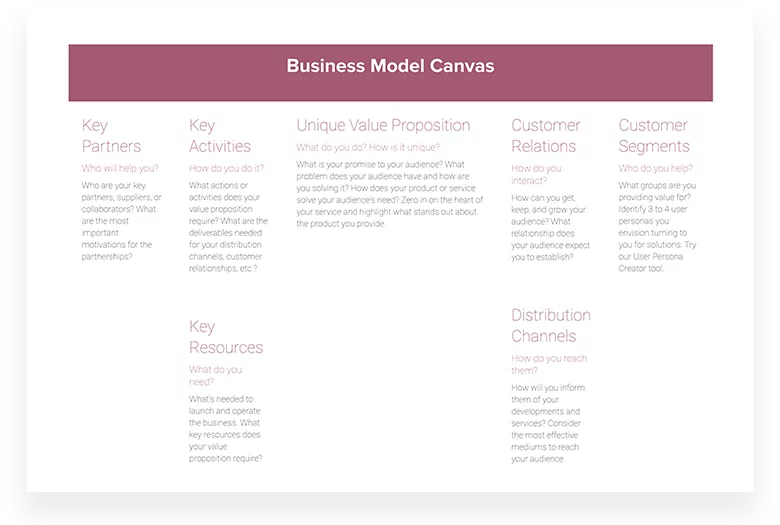
The lean canvas replaces Key Partners, Key Activities, Key Resources, and Customer Relationships (from the BMC) with Problem, Solution, Key Metrics, and Unfair Advantage. This trade reflects its purpose: at the pre-product stage, you need to validate your problem hypothesis and identify what makes you defensible, not design your operational infrastructure. The lean canvas is intentionally biased toward uncertainty — it acknowledges that most of its boxes are guesses and structures those guesses for rapid testing.
The business model canvas is better suited once you have established product-market fit. It captures the operational reality of a working business — who your key partners are, what your key activities are, and how your resources are deployed. These questions are premature when you are still validating whether the problem is real.
A practical approach: start with the lean canvas at founding, revisit and update it quarterly through the validation phase, then transition to a business model canvas once you have 50+ paying customers and have stabilized your core value proposition. Some teams maintain both — the lean canvas for product-market fit work and the BMC for operational planning and investor conversations.
Common Lean Canvas Mistakes
- Treating it as a one-time document. The lean canvas should change every time you learn something that invalidates an assumption. If your canvas looks identical after three months of customer interviews and product iterations, you are not using it correctly.
- Filling in all nine boxes with equal confidence. Some boxes are well-evidenced; others are pure guesses. Marking your confidence level (high/medium/low/unknown) for each box turns the canvas into a prioritized learning plan — you know exactly which assumptions need validation first.
- Making the problem box too broad. “People waste time on manual processes” is not a problem — it describes a symptom shared by almost every business. A specific problem names who experiences it, in what context, and how frequently. Specificity here determines the specificity of your solution and your go-to-market approach.
- Skipping the existing alternatives column. Most teams list direct competitors as the only alternatives. In reality, your competition includes doing nothing, using a spreadsheet, hiring a consultant, or building it internally. Understanding what customers actually do today — not just which startups compete with you — reveals why customers might not switch to your solution even if they like it.
Lean Canvas vs Business Model Canvas vs Value Proposition Canvas
These three canvases look similar at first glance but serve fundamentally different purposes. Choosing the wrong one wastes your team’s time and produces insights that do not match your stage or situation.
The Lean Canvas is designed for early-stage startups testing unproven ideas. It replaces the Business Model Canvas’s “Key Partners” and “Key Activities” boxes with “Problem” and “Solution” because at the startup stage, understanding whether a real problem exists matters more than operational details. The Lean Canvas forces you to articulate your unfair advantage and cost structure before you have revenue, making it a hypothesis document rather than a business description. Use it when you are pre-product-market fit and need to identify which assumptions carry the most risk.
The Business Model Canvas maps how an established business creates, delivers, and captures value. It covers key partners, key activities, key resources, value propositions, customer relationships, channels, customer segments, cost structure, and revenue streams. It works best for existing businesses exploring new revenue streams, planning expansions, or documenting a business model for stakeholders. If you already have paying customers and a repeatable process, the Business Model Canvas template is the right starting point.
The Value Proposition Canvas zooms in on one slice of the Business Model Canvas: the fit between what you offer and what your customer needs. It maps customer jobs, pains, and gains against your products, pain relievers, and gain creators. Use it when you have a clear customer segment but need to sharpen your value proposition or when your messaging is not resonating despite having a strong product.
In practice, many teams use all three at different stages. Start with a Lean Canvas to test your core hypothesis, graduate to a Business Model Canvas once you have traction, and use the Value Proposition Canvas whenever you launch a new product or enter a new segment. Keep all three in the same workspace so your strategic thinking stays connected as your business evolves.
How to Validate Each Lean Canvas Block
A Lean Canvas filled with untested assumptions is just an opinion document. The real value comes from systematically validating each block with evidence. Here is how to test the blocks that carry the most risk.
Problem validation
Before building anything, confirm that the problem you identified is real, frequent, and painful enough that people will pay to solve it. Conduct 15 to 20 customer discovery interviews focused on how prospects currently deal with the problem. Ask what they have tried, how much time or money the problem costs them, and what would change if it were solved. If fewer than half of your interviews confirm the problem exists in the way you described it, revisit your problem statement before moving forward.
Solution validation
Test your solution with the smallest possible experiment. This might be a landing page that describes the solution and measures sign-up intent, a concierge MVP where you deliver the solution manually, or a prototype that demonstrates the core workflow. The goal is not to build a product but to answer one question: will people use this? Track engagement metrics (sign-ups, time spent, return visits) rather than asking “would you use this?” because stated interest rarely matches actual behavior.
Channel validation
Run small-budget acquisition experiments across two to three channels simultaneously. Spend enough to get statistically meaningful data (typically 500 to 1,000 visitors per channel) and measure cost per acquisition, not just traffic. A channel that sends 10,000 visitors at $0.50 each but converts at 0.1% is more expensive than a channel that sends 500 visitors at $5 each but converts at 5%. Test channels that match your customer’s behavior, not channels that are trendy.
Revenue validation
The strongest revenue signal is a transaction, not a survey response. If possible, collect pre-orders, deposits, or letters of intent before building the full product. If your model is subscription-based, test willingness to pay by offering a paid beta at different price points. Track not just whether people will pay, but how much they will pay, how quickly they decide, and what they compare your price to. These signals tell you whether your revenue model is viable or aspirational.
Iteration cadence
Set a regular review cycle for your Lean Canvas. Weekly is ideal in the early stages, biweekly once you have initial traction. At each review, update the canvas with new evidence, mark which assumptions have been validated or invalidated, and decide which block to test next. A Lean Canvas that does not change is a Lean Canvas that is not being used. Share your canvas as a live link with co-founders and advisors so everyone sees the same current version. Read the full walkthrough in our how to create a Lean Canvas guide.
Teams use Xtensio to create, share, and improve professional deliverables.
Trusted by 411,389 teams, founders, and consultants.



Grace Ghunaim
Global Chief Strategy Officer (CSO) @

David Nason
CEO/Founder @

Jeff Schenck
Marketing Manager @

Ryan Dobson
Global Engineering Manager @

Arthur van de Graaf
Founder @

Apurva Pathak
Technical Product Manager @

Jenny Johansson
UX Manager @

Zac Heisey
Director of Digital Marketing @

Jacklyn Swiecicki
Marketing Manager @

Create and deliver beautiful work, professionally.
Build, brand, and deliver living documents your clients actually engage with.







Join 411,389 professionals delivering work with Xtensio.

