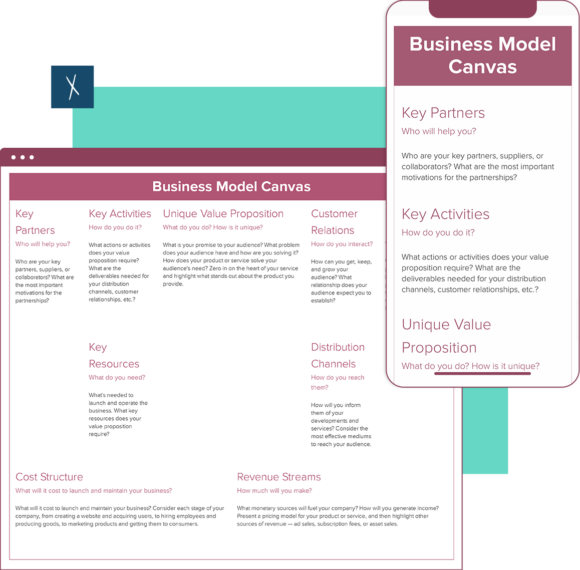
Business Model Canvas Template
⚡ Build your business model — 10x faster with AI.
Xtensio’s AI Business Model Canvas Builder helps you map, test, and refine your company’s strategy — in minutes, not day.
AI researches your idea, brand, and market to help you:
- Define your value proposition and product–market fit with clarity.
- Visualize customer segments, revenue streams, and key activities in a simple, editable canvas.
- Align your team or clients instantly — collaborate, update, and share your plan as it evolves.
Xtensio is your team’s deliverables workspace.
Create, collaborate, and deliver client-ready docs—then keep them current.
Join 410,571 using Xtensio.
Xtensio is the workspace for professional deliverables.
Make one deliverable today—then build a repeatable system for every client and project.
This is where teams create, collaborate, organize, and deliver the documents that run their work.
Everything stays on-brand, current, and ready to share.

Organize every deliverable
Keep strategy, sales, marketing, and client docs together by workspace.
Create fast, stay consistent
Start from 200+ templates or AI drafts, then apply your brand kit.
Collaborate in the doc
No more “final_v7.pdf” loop.
Standardize across deliverables
Apply your brand kit + reusable modules so every deliverable matches.
Improve what you send
See engagement, iterate, and reuse what works across projects.
How to create a business model canvas with Xtensio
- Create a free account and start editing, no credit card required.
Follow along with the instructional canvas template details. Add charts, graphs, images, and videos. Drag & drop. Resize. Customize the canvas format however you need. It’s the easiest editor ever.
- Customize everything in the template to match your brand.
Define your style guide. Add your (or your client’s) brand fonts and colors. You can even pull colors directly from a website to easily brand your business model canvas and more.
- Work on your value proposition and business models together on the cloud.
Add colleagues (or clients) to collaborate on the business model canvas template. Changes automatically save and sync across all devices, in real-time.
- Share a link. Present a slideshow. Embed. Download a PDF/PNG.
The business model canvas seamlessly adapts to your workflow. No more jumping from tool-to-tool to design different types of deliverables.
- Reuse and repurpose.
Save your own custom business model canvas template. Or copy and merge into other documents.

What is a business model canvas template?
The business model canvas was proposed by Alexander Osterwalder based on his book: Business Model Ontology. The template provides the structure of a business plan in a concise, 9-segment canvas that outlines business elements to describe how your company plans to bring in revenue streams.
New business ideas, startups and evolving companies use business models to identify key resources, target their ideal customer segment, outline key partners and structure their main revenue stream. A well-developed business model canvas will help streamline planning, development, and execution across your business. It should align everyone’s goals and reduce discrepancies among the numerous people who contribute to your business goals.
What are the 9 parts of a business model?
There are 9 building blocks in the business model canvas that outline key business drivers. These building blocks are key elements in understanding how your business can make money.
- Key Partnerships: Who would you like to have as your business partners, suppliers, or collaborators on your business idea?
- Key Activities: Identify the key steps you need to take in order for your business to deliver on its promises and make sure development rolls out smoothly. What actions or activities do your value propositions require you to make?
- Key Resources: Identify your key resources and find your differentiating factor among your competitors. What strategic assets do you need to launch and operate your business?
- Unique Value Proposition: Your value proposition should clearly and immediately express the value that your service or product provides to the customer. What is your business promising to its audience, and how does your product or service stand out? If you have multiple customer segments you may have a few different value propositions.
- Customer Relationships: Determine how your customers will interact with your products and services (internet, phone, in-person). Then write down guidelines for creating, maintaining, and growing your customer relationships.
- Distribution and Marketing Channels: These are the different channels your team uses to communicate, sell, or provide service for customers.
- Customer Segments: Who are your key customers? Investigate your customer needs and problems to identify what channels are ideal for each of your customer segments.
- Cost Structure: This section will go over the costs connected with your business model and identify cost drivers. What will the cost of launching and maintaining your new products and services be? Consider how your key activities contribute to costs and whether these costs are in line with your value propositions.
- Revenue Streams: How will your business make money? Where is your company driving new business and income from?
Design, manage and share beautiful living documents… easily, together. Explore Xtensio
- Click and edit anything… together.
- Customize to match your branding.
- Share with a link, present, embed or download.
Related to the Business Model Canvas Template
Fully customizable templates that you can make your own.
The 9 building blocks of the Business Model Canvas
Alexander Osterwalder’s Business Model Canvas organizes your business model into 9 interconnected blocks. Here is what each one means and how to fill it out:
- Customer Segments — Who are your most important customers? Define the groups of people or organizations you aim to serve. Be specific: “small marketing agencies with 5-20 employees” not “businesses.”
- Value Propositions — What value do you deliver to each customer segment? What problem do you solve or what need do you satisfy? This is the core of your business model.
- Channels — How do you reach your customer segments? Through which channels do they want to be reached? This covers marketing, sales, and delivery channels.
- Customer Relationships — What type of relationship does each customer segment expect? Self-service, personal assistance, community, co-creation?
- Revenue Streams — How does each customer segment pay? Subscription, one-time purchase, licensing, advertising, freemium?
- Key Resources — What assets does your business model require? Physical, intellectual, human, financial?
- Key Activities — What are the most important things your company must do to make the business model work?
- Key Partnerships — Who are your key partners and suppliers? What resources or activities do they provide?
- Cost Structure — What are the most important costs inherent in your business model? Fixed costs, variable costs, economies of scale?
Business Model Canvas vs Lean Canvas
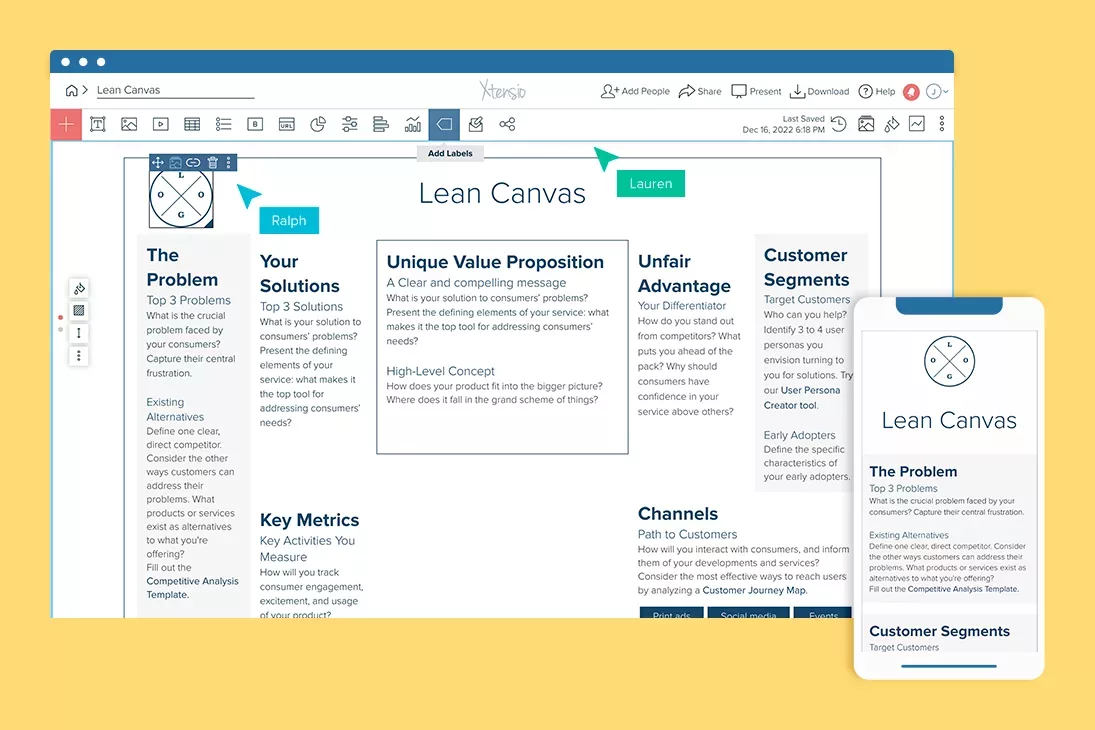
The Lean Canvas, created by Ash Maurya, adapts the BMC for early-stage startups by replacing four blocks:
- Key Partners → Problem — What are the top 3 problems your customers face?
- Key Activities → Solution — What is your proposed solution for each problem?
- Key Resources → Key Metrics — What numbers will tell you the business is working?
- Customer Relationships → Unfair Advantage — What do you have that cannot be easily copied or bought?
Use the Business Model Canvas when you are designing or refining an established business model, evaluating strategic options, or communicating your model to investors and partners. Use the Lean Canvas when you are in the earliest stages of validating a startup idea and need to move fast through assumptions.
Why iterate on your BMC in a shared workspace
A Business Model Canvas is not a one-time exercise. Your business model evolves as you learn from customers, test pricing, explore new channels, and pivot your value proposition. The canvas should evolve with it.
With Xtensio, your Business Model Canvas lives in a workspace where your founding team can:
- Iterate in real time — Update blocks as assumptions are validated or invalidated. No version confusion.
- Collaborate with cofounders and advisors — Everyone works on the same canvas, not separate copies.
- Connect it to downstream deliverables — Your BMC informs your pitch deck, one-pager, and investor updates. Keep them all in one workspace.
- Share with investors — Send a branded live link that always shows your latest business model thinking.
- Compare versions over time — Track how your business model has evolved from idea stage through product-market fit.
The best business models are discovered through iteration, not designed in a single workshop. Build your canvas in a workspace that supports continuous refinement.
Using the BMC at Different Business Stages
The business model canvas is not only a tool for startups. Its value changes depending on where your company is in its lifecycle, and understanding that context helps you get more out of each session.
Pre-Product: Validating Assumptions
Before you have a product, the BMC is a hypothesis document. Every box represents an assumption — some testable immediately, others requiring months of customer interviews. At this stage, the most important boxes are Customer Segments and Value Propositions: you are trying to answer whether a real problem exists for a specific, identifiable group of people who would pay to have it solved. Leave the Revenue Streams and Cost Structure boxes deliberately rough — precision here is false confidence before product-market fit exists.
Mark each assumption with your confidence level (high/medium/low) and the evidence you have for it. The goal of the pre-product BMC is not to design a business model — it is to identify which assumptions are most critical and need to be tested first. Focus experiment design on the highest-risk, lowest-evidence boxes.
Early Traction: Finding What Works
Once you have early customers, the BMC becomes a pattern-recognition tool. Look at who is actually buying, not who you imagined would buy. Your real Customer Segments often differ from the target segments in your original canvas. Update the canvas to reflect reality rather than the original thesis, and trace the implications: if the actual customer segment is different, the Channels they use, the Value Propositions that resonate, and the Cost Structure required to serve them may all shift.
At this stage, the Revenue Streams box becomes critical. Test pricing models — subscription vs. usage-based vs. one-time — and track retention by segment. Churn data tells you whether your value proposition is delivering on its promise. A segment with strong acquisition but weak retention signals a gap between the promise and the product experience.
Scaling: Identifying Constraints
At scale, the BMC helps you identify which boxes have become constraints. If your Key Resources box requires talent you cannot hire fast enough, or your Key Partnerships depend on one vendor who could change terms, these are risks that need mitigation plans. The canvas at this stage should be reviewed alongside your P&L — the Cost Structure and Revenue Streams boxes should align with your actual financial model, not the aspirational one from year one.
Common Business Model Canvas Mistakes
- Treating it as a one-time exercise. A BMC completed once and filed away provides no ongoing value. The canvas is useful precisely because it can be updated quickly when assumptions change. Review it at least quarterly, or whenever you make a significant strategic decision.
- Being too vague in Customer Segments. “Small businesses” is not a segment — it is a demographic. A segment is a specific group with a specific problem and specific buying behavior. “Marketing agencies with 5–25 employees that manage more than 10 active client accounts” is a segment. The more specific you are, the more useful the rest of the canvas becomes.
- Confusing features with value propositions. “Our software has AI” is a feature. “Our software reduces the time to produce a monthly client report from 4 hours to 20 minutes” is a value proposition. Value propositions are outcomes for customers, not capabilities of your product.
- Skipping the cost structure. Founders frequently fill out the right side of the canvas (revenue-generating boxes) in detail while treating the left side (cost-generating boxes) as secondary. Sustainable business models require both sides to work. If your cost structure cannot support a profitable unit economics model at your expected scale, the business model needs revision before you find that out from your bank account.
- Running the BMC session without diverse perspectives. A canvas filled in by the founder alone reflects one person’s assumptions. The most valuable BMC sessions include someone from sales (who knows why deals are won and lost), someone from customer success (who knows why customers churn), and ideally an existing customer. Each role will surface assumptions the founding team has naturalized and stopped questioning.
From Business Model Canvas to Execution
The BMC answers “how does our business work?” but does not answer “what should we do next?” Bridging from canvas to execution requires mapping canvas outputs to operational decisions.
Start with the Value Proposition and Customer Segments — these two boxes define your product roadmap priorities. Features that serve your highest-value segment and reinforce your core value proposition get prioritized. Features that serve edge cases or secondary segments do not.
The Channels box drives your go-to-market strategy. If your best-performing channel is direct sales, your hiring plan should prioritize sales reps. If it is content-driven organic acquisition, you invest in editorial and SEO. The canvas makes these connections explicit instead of leaving them as implicit assumptions embedded in someone’s spreadsheet.
The Key Partnerships box should inform your business development roadmap — which integrations, reseller relationships, or co-marketing agreements would meaningfully extend your reach without proportionally increasing your cost structure. Every partnership in this box should be evaluated on that criterion.
For startups deciding between the BMC and the lean canvas, the lean canvas is better suited to the pre-product validation stage — it replaces Key Partners and Key Activities with Problem and Unfair Advantage, which are more useful when you are still testing your core hypothesis. Use the BMC once you have established product-market fit and are designing the business model around a working product.
Teams use Xtensio to create, share, and improve professional deliverables.
Trusted by 410,571 teams, founders, and consultants.



Jerome Katz
Professor of Entrepreneurship @

Jake Peters
CEO @

Robin Bramman
Founder and Chief Brand Mixologist @

Alix Han
VP Product Experience @

Marc Anthony Rosa
Product Manager @

Anna Yunker
Content Strategist @

Robin Eyre
Owner @

Adam Sher
CEO @

Humma Arshad
Salesforce Project Manager @

Create and deliver beautiful work, professionally.
Build, brand, and deliver living documents your clients actually engage with.







Join 410,571 professionals delivering work with Xtensio.
How Does Xtensio Compare?
Wondering how Xtensio stacks up against other tools? Here’s the short version:
Xtensio vs Canva: Canva is great for quick graphics, but when your BMC needs to be a living document that your team updates weekly, you need a workspace built for collaboration.
Xtensio vs Google Docs: Google Docs can hold a BMC table, but it can’t turn that table into a shareable, branded deliverable your stakeholders actually want to open.
Xtensio vs Notion: Notion databases are flexible, but they’re built for internal wikis — not for client-facing strategy deliverables you need to present and share.
See the full comparison guide to find which tool fits your workflow best.

