
How-to Guide
How to Write an Audit Report
An audit report should tell a client what is working, what needs attention and what to do first. Here is how to structure one, section by section.
Many audits end in a long document that lists every problem found, in the order the auditor found them. The client reads the first few pages, feels overwhelmed and files it. Six months later nothing has changed, and the audit is remembered as an expense rather than the start of a project.
A useful audit report does the opposite. It opens with an overall verdict, scores each area so the client can see where the problems are, explains the findings in plain words and ends with a short list of what to do first. This guide walks through each section. It is written for the audits consultants and agencies run for clients, such as a website, marketing, brand, content or process audit, rather than a statutory financial audit.
What an Audit Report Is For
An audit report has three readers, and each one wants something different:
- The decision maker wants the verdict and the top priorities, in a minute or two.
- The team doing the work wants the detail: what is wrong, where, and how to fix it.
- You want a clear next step, often a follow-on project to fix what the audit found.
A good structure serves all three: the summary at the top, the detail in the middle, and recommendations and next steps at the end.
What to Include in an Audit Report
These six parts cover most client audits, in the order the client reads them:
- Summary and overall rating. The verdict in a few sentences, with one overall score.
- Scope and method. What you looked at, what you did not, and how you assessed it.
- Scores by area. A score for each area audited, so the weak spots stand out.
- Key findings. What works and what needs attention, in plain words.
- Recommendations. A checklist of actions in priority order.
- Appendix and next steps. Supporting detail, and what happens after the report.
The Audit Report Template has all six sections in this order, with a short prompt in each one telling you what to write, and a finished example to follow.
Lead With the Verdict
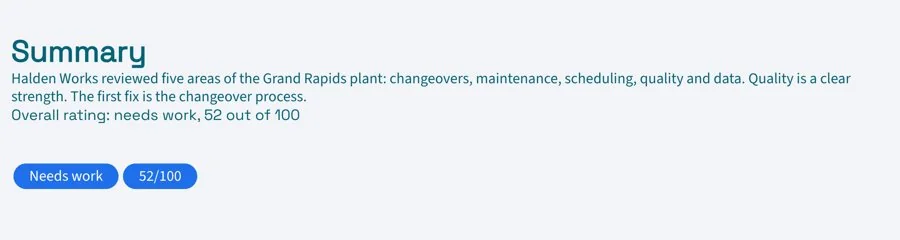
Put the conclusion first. In three or four sentences, say how the client is doing overall, the single biggest issue and the single biggest opportunity. Add an overall rating, such as a score out of ten or a simple scale from poor to strong, so the verdict is clear at a glance. Many readers will stop here, so make sure the summary alone tells them what they need to know.
Set Out the Scope and Method
A short scope section protects both sides. List what the audit covered, such as the website, paid campaigns and email, and what it did not cover. Then explain how you assessed each area: the tools you used, the period of data you looked at, any interviews or reviews, and the standard you scored against. When a client later asks why something was not mentioned, the answer is already on the page.

Score Each Area the Same Way
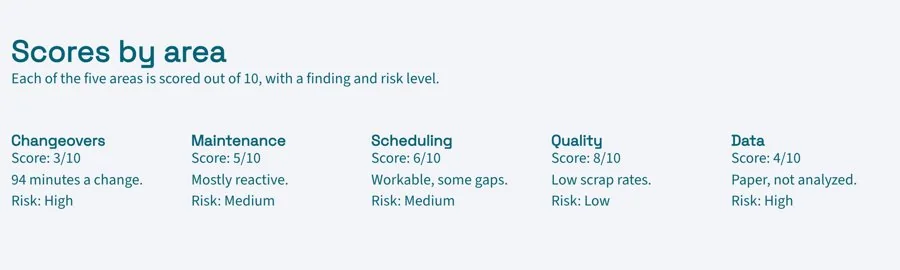
Scores let a client see in seconds where to focus. Pick one scale and use it for every area, then explain it once: what a low, middle and high score means. Give each area a score and one sentence of explanation.
Keep scores honest. If everything scores well, the report loses its value; if everything scores badly, the client stops listening. Most audits find a mix, and showing where things are strong makes the weak areas more believable.
Report What Works as Well as What Needs Attention
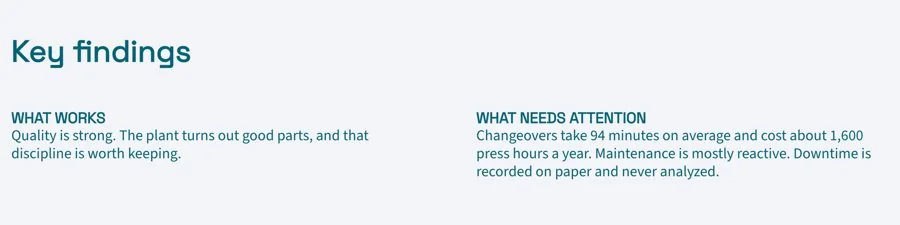
Split the findings into two groups. Start with what is working, because it tells the client what to keep and shows the audit was fair. Then list what needs attention. For each finding, write:
- What you found, in one plain sentence
- Why it matters to the client’s goals
- The evidence, such as a figure, a screenshot or an example
Group related issues together rather than listing every instance. “Twelve pages have no meta description” is one finding, not twelve.
Turn Findings Into Recommendations in Priority Order
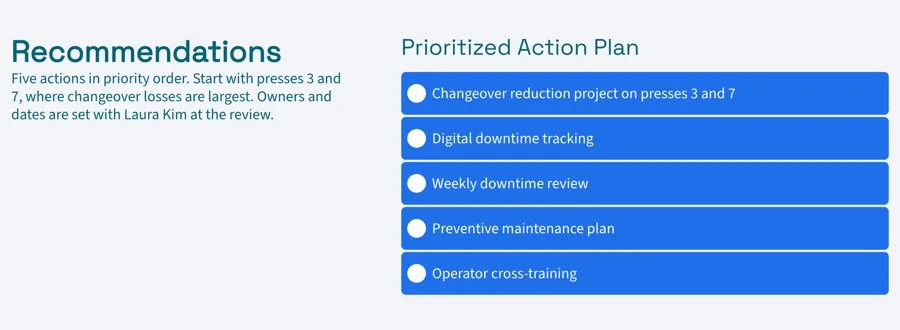
This is the section the client will use most. Turn the findings into a checklist of actions, ordered by priority. A simple way to order them is by impact and effort: quick fixes with a big effect first, larger projects next, small improvements last. For each action, note who should own it and roughly how long it takes.
Ten well-chosen recommendations are more useful than fifty. Put the rest in the appendix.
Keep the Detail in the Appendix and End With Next Steps
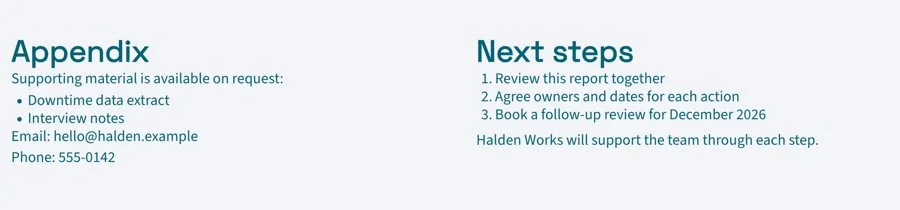
Move raw data, long lists and technical detail into an appendix so the main report stays readable. Then close with next steps: when you will walk through the report together, what you can help with, and when a follow-up audit would make sense to measure progress.
Share It as a Live Link, Not an Attachment
An audit report is the start of the work, not the end. As the client fixes issues, the recommendations checklist changes, and as you discuss the findings, you add detail. A PDF freezes the report on the day you sent it.
Share a live link instead. The client’s team works from one page, and you can tick off recommendations as they are done, so the report doubles as a progress tracker. Keep it in a project workspace with any follow-on work and monthly client reports, and invite the client in. With engagement analytics you can see whether the client opened the report before your review call. Download a PDF if their board or procurement team needs a file.
Common Audit Report Mistakes
- Burying the verdict. If the summary is on page six, most readers never reach it.
- Listing every issue at the same weight. Without priorities, the client cannot tell where to start.
- Only reporting problems. Leaving out what works makes the audit look one-sided.
- Findings without evidence. Every claim should point to something the client can check.
- No next step. End with what happens now, or the report gets filed.
Prefer to start with AI? The AI Audit Report Generator writes a first draft from your audit notes, with the summary, scores by area, findings and prioritized recommendations, ready for you to edit.
Related Templates and Guides
- Audit Report Template
- Executive Summary Template
- Monthly Client Report Template
- Competitive Analysis Template
- Consulting Proposal Template
Frequently Asked Questions
What is an audit report?
A document that reviews how something is performing against a standard, such as a website, a marketing program or a process, and recommends what to change. It usually includes a summary, scores, findings and recommendations.
How long should an audit report be?
The main report should be short enough to read in one sitting, often a few pages. Supporting data can go in an appendix of whatever length it needs.
What scoring scale should I use?
Any simple scale works if you use it consistently and explain it once, such as one to five or one to ten. A short label for each score, like “needs work” or “strong”, helps readers who skim.
Should I include fixes or only findings?
Include recommendations. A client who pays for an audit wants to know what to do next, and a prioritized list of actions is usually the part of the report they use most.
How often should an audit be repeated?
It depends on how fast the area changes. Many teams repeat a marketing or website audit every six to twelve months to measure progress against the first one.
Ready to write your next audit report?
Start from the template, add your scores and findings, and share one live link the client’s team can work from. Free, no credit card required.

