
How-to Guide
How to Run a Quarterly Business Review
A good QBR shows results against goals, sets the next quarter, and ends with decisions. Here is how to prepare the document and run the meeting.
Every three months, a retainer client asks some version of the same question: is this worth it? A quarterly business review, or QBR, is where you answer it before they ask. Done well, it reminds the client what they are paying for, sets next quarter’s goals, and makes renewal a short conversation. Done badly, it is a long slideshow of activity that nobody remembers a week later.
This guide covers how to prepare a QBR, what to put in the document, and how to run the meeting so it ends with decisions.
What a Quarterly Business Review Is For
A QBR is not a monthly report stretched to cover three months. It steps back and answers bigger questions:
- Did we hit the goals we agreed at the start of the quarter?
- What did we learn that changes what we do next?
- Is the retainer or budget being used well?
- What should next quarter focus on?
- Is there anything to decide, including renewal?
If your monthly client report already covers the detail, the QBR can stay short and focus on direction.
Prepare Two Weeks Ahead
Book the meeting early and send the document a few days before it. Ask the client in advance what they want to cover, so nothing in the room is a surprise. Invite the person who decides on budget and renewal, not only your day-to-day contact. Then pull the numbers for each goal while there is still time to check them.
What to Include in a QBR Document
These six parts cover most client reviews, in the order the meeting runs:
- Quarter at a glance. The headline results, the biggest win, the main issue and what you will ask for.
- Results against goals. Each goal with its target, the actual result and a status.
- What you delivered and learned. The main pieces of work, and what they taught you.
- Retainer and budget use. Hours or spend used against what was agreed.
- Next quarter’s goals. Three to five goals, each with a target and an owner.
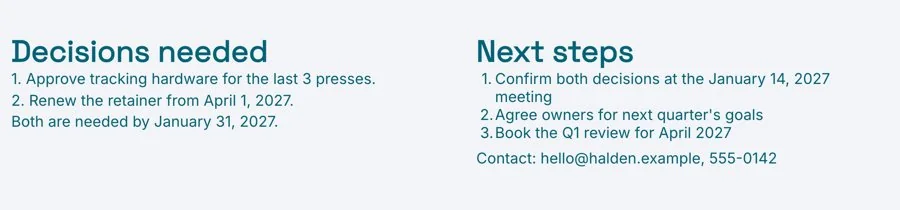
- Decisions needed and renewal. What you need the client to decide before you leave the room.
The Quarterly Business Review Template has these six sections in this order, with a short prompt in each one telling you what to write, and a finished example to follow.
Open With the Quarter at a Glance
Start with a few lines a busy executive can read in a minute: the headline results, the biggest win, the main problem and what you will ask for at the end. If they read nothing else, they should still know how the quarter went.

Show Results Against Goals, Honestly
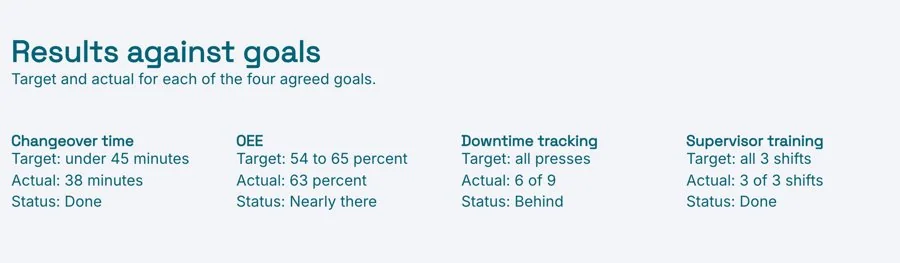
List each goal agreed at the start of the quarter with three columns: target, actual and status. Use plain status labels such as on track, behind and missed. Report misses as clearly as wins, with a sentence on why and what you will change. Clients trust a review that admits a miss far more than one where everything is green.
Summarize What You Delivered and What You Learned
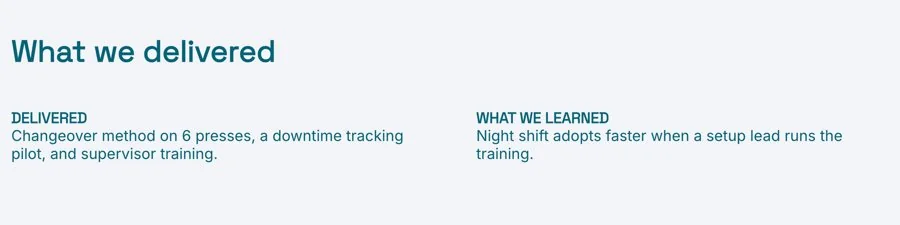
Keep the delivery list short: the main pieces of work, not every task. Then add what you learned: which tactics worked, what surprised you, what the results say about the client’s customers. The learning is often the most useful part for the client, because it is what they cannot get from a list of tasks. A strong result may also be worth turning into a case study, with the client’s permission.
Show How the Retainer and Budget Were Used
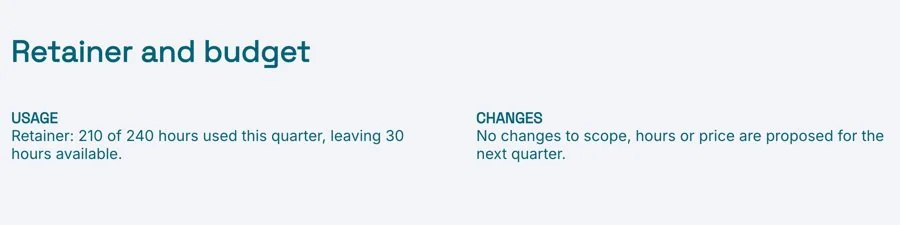
Show the hours or budget used against what was agreed, split by type of work if that helps. If you went over or under, say why. This is the section where clients decide whether the retainer is the right size, so make it easy to read and hard to misunderstand.
Agree Next Quarter’s Goals
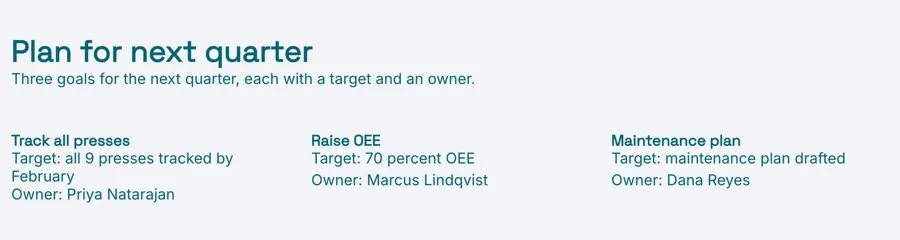
Propose three to five goals for the next quarter, each with a target and an owner. Tie them to what the client’s business needs, not only to what is easy to measure. Agree them in the meeting, and they become the first rows of the next QBR. For longer relationships, a customer success plan keeps the goals for the year in one place.
End With Decisions and Renewal
List the decisions you need: approvals, budget changes, new work, priorities to drop. If the retainer is up for renewal, put it on the page rather than leaving it for a later email. A clear ask, made straight after an honest review, is the easiest renewal conversation you will have.
Run the Meeting as a Conversation
If the client has read the document, the meeting can skip the walkthrough. Spend a few minutes on the headline, most of the time on results, learning and next quarter, and the last ten minutes on decisions. Before the end of the day, update the page with what was agreed, so it stays an accurate record.
Send It as a Live Link, Not an Attachment
Send the QBR as a live link a few days before the meeting. The client gets one URL they can share with their team, and any update you make after the meeting shows at the same link. With engagement analytics you can see whether the client opened it beforehand, which tells you whether to walk through it or go straight to decisions.
Keep each review in a project workspace with the monthly reports and the success plan, so the client has every quarter in one place. Download a PDF for anyone who needs a file.
Common Quarterly Business Review Mistakes
- Reporting activity instead of results. Forty completed tasks mean little next to one goal hit or missed.
- Hiding misses. The client usually knows already, and silence costs more trust than the miss.
- Only inviting your day-to-day contact. If the budget holder is not there, renewal waits for another meeting.
- No goals for next quarter. Without them, the next review has nothing to measure.
- Leaving renewal for later. The review is the best moment to ask, while the results are in front of everyone.
Prefer to start with AI? The AI Quarterly Business Review Generator writes a first draft from your notes and results, with the quarter at a glance, results against goals, budget use, next quarter’s goals and decisions, ready for you to edit.
Related Templates and Guides
- Quarterly Business Review Template
- Monthly Client Report Template
- Customer Success Plan Template
- Case Study Template
Frequently Asked Questions
What is a quarterly business review?
A quarterly business review is a meeting, and a document, where you review a quarter’s results with a client against the goals you agreed, and set the goals for the next quarter.
Who should attend a QBR?
Your account or project lead, the client’s day-to-day contact, and the person on the client’s side who decides on budget and renewal. Keep the list short enough for a real conversation.
How long should a QBR meeting be?
About an hour is common for a retainer client. If the document is sent ahead and read, 45 minutes is often enough.
What is the difference between a QBR and a monthly report?
A monthly report tracks progress and activity. A QBR steps back to review results against goals, the budget and the direction for the next quarter, and usually ends with decisions.
Should I send it as a PDF or a link?
A live link, sent a few days before the meeting, so the client can read it first and you can update it with what was agreed. Download a PDF if someone needs a file.
Ready for your next QBR?
Start from the template, add the quarter’s results, and send one live link the client can read before the meeting. Free, no credit card required.

