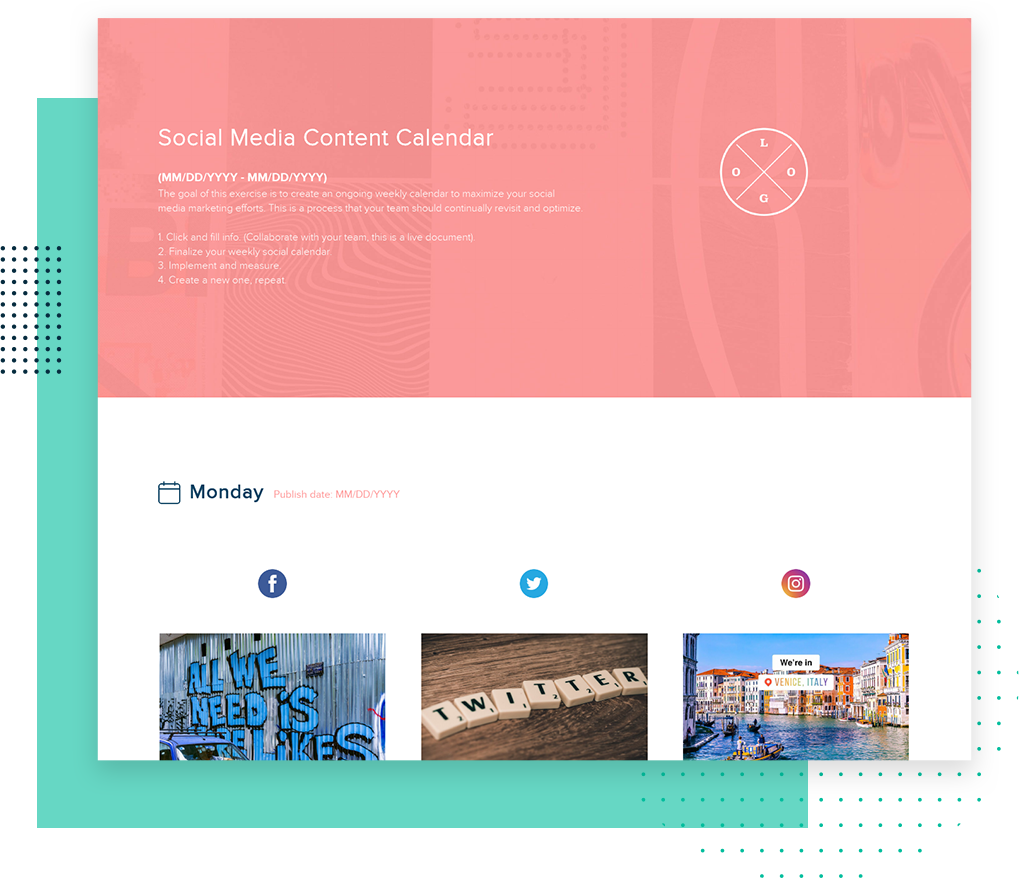
Social Media Content Calendar Template
The social media calendar is a necessary tool to streamline your team’s content creation process. It helps you plan when and which content will be shared, manage campaigns, and track deadlines.
- Create a plan to consistently share social media content your target audience wants to see.
- Eliminate confusion across departments and streamline content creation.
- Easily analyze your past posts to track high-level KPIs related to larger marketing initiatives.
Xtensio is your team’s deliverables workspace.
Create, collaborate, and deliver client-ready docs—then keep them current.
Join 409,446 using Xtensio.
Xtensio is the workspace for professional deliverables.
Make one deliverable today—then build a repeatable system for every client and project.
This is where teams create, collaborate, organize, and deliver the documents that run their work.
Everything stays on-brand, current, and ready to share.

Organize every deliverable
Keep strategy, sales, marketing, and client docs together by workspace.
Create fast, stay consistent
Start from 200+ templates or AI drafts, then apply your brand kit.
Collaborate in the doc
No more “final_v7.pdf” loop.
Standardize across deliverables
Apply your brand kit + reusable modules so every deliverable matches.
Improve what you send
See engagement, iterate, and reuse what works across projects.
How to create a social media content calendar with Xtensio
- Create a free account and start editing, no credit card required.
Follow along with the instructional social media calendar details. Add charts, graphs, images, and videos to customize the social media content calendar template and make it your own. Drag & drop. Resize. It’s the easiest editor ever.
- Customize everything in the social media calendar template to match your brand.
Define your style guide. Add your (or your client’s) brand fonts and colors. You can even pull colors directly from a website to easily brand your social media content calendar and more.
- Work on the social media calendar together on the cloud.
Add colleagues (or clients) to collaborate on the social media calendar template. Changes automatically save and sync across all devices, in real-time.
- Share a link. Present a slideshow. Embed. Download a PDF/PNG.
The social media calendar template seamlessly adapts to your workflow. No more jumping from tool-to-tool to design different types of deliverables.
- Reuse and repurpose.
Save your own content calendar templates. Or copy and reuse in other documents.

What is a social media content calendar?
An ongoing social content calendar will help streamline your digital marketing efforts across the entire organization and help build a strong brand for your company. The goal of this exercise is to create an ongoing weekly calendar to maximize your social media marketing efforts by consistently creating high-quality content.
How do I create a social media content calendar?
Whether you’re just getting started building your organization’s social media strategy or you’re refining what’s already in place, it can be an overwhelming task to come up with ideas to fill your social content calendar. But it’s a necessary task in order to help you set realistic goals for your social strategy.
Here are some steps you can take to determine the type of content that will resonate with your audience:
- Conduct a social media audit.
- Decide on topics and keywords.
- Choose a mix of content types.
- Determine how often and when to post.
- Create a social media content repository.
- Define a collaborative content creation and review process.
- Schedule and publish your social media content.
- Track and measure your success.
Explore our content marketing process essentials for other instructional templates beautifully designed and ready to present.
Design, manage and share beautiful living documents… easily, together. Explore Xtensio
- Click and edit anything… together.
- Customize to match your branding.
- Share with a link, present, embed or download.
Related to the Social Media Content Calendar Template
Fully customizable templates that you can make your own.
What is a social media content calendar?
A social media content calendar is a planning document that organizes your social media posts across platforms, dates, and campaigns. It maps out what you will publish, when you will publish it, and on which channels. Unlike a simple spreadsheet of dates and captions, a content calendar connects individual posts to larger campaign goals, tracks visual assets alongside copy, and gives your entire team visibility into what is going out and when.
Teams that plan content in advance consistently outperform teams that post ad hoc. A calendar eliminates last-minute scrambles, ensures consistent brand voice across platforms, and makes it easy to balance content types: promotional, educational, community-building, and engagement-driven posts.
What to include in your content calendar
An effective social media content calendar covers more than just dates and captions. Here are the essential elements:
- Platform — Which channel each post targets (Instagram, LinkedIn, X, TikTok, Facebook). Cross-posting should be noted but adapted for each platform’s format.
- Post date and time — Scheduled publish date and optimal posting time for the target audience on each platform.
- Content type — Carousel, single image, video, story, reel, text post, or link share. Each format has different production requirements.
- Copy and caption — The actual text that accompanies the visual. Include hashtags, mentions, and any platform-specific formatting.
- Visual assets — Images, videos, or graphics linked or embedded in the calendar. Avoid referencing files that live in someone’s local folder.
- Campaign or theme — Which initiative the post supports: product launch, awareness campaign, seasonal promotion, evergreen content.
- Status — Draft, in review, approved, scheduled, published. This keeps the approval workflow visible.
- Owner — Who is responsible for creating, reviewing, and publishing each post.
Content calendar vs. scheduling tool
Scheduling tools like Buffer, Hootsuite, and Later handle the mechanics of publishing: queue posts, set times, and auto-publish. But they are not planning tools. They answer “when does this post go live?” but not “why are we posting this?” or “how does this fit into the campaign?”
A content calendar is the strategic layer above scheduling. It is where you plan content themes, balance post types across the week, align posts with product launches and campaigns, and coordinate across team members. Most teams use both: the calendar for planning and the scheduling tool for execution.
How to build a content calendar that actually gets used
- Start with your content pillars — Define 3-5 content themes that align with your brand strategy. Every post should map to a pillar. If it does not fit, question whether it belongs.
- Set your posting cadence — Decide how many posts per platform per week. Be realistic. Three quality posts beat seven mediocre ones.
- Plan in monthly or biweekly sprints — Plan content in batches. Block time to fill the calendar 2-4 weeks ahead. This gives the team runway for production and review.
- Build in flexibility — Leave 20-30% of slots open for reactive content: trending topics, industry news, community engagement opportunities. A rigid calendar breaks the first week.
- Make it shareable — A calendar locked in one person’s spreadsheet is useless to the team. Share it as a live document so everyone sees the current state without asking for the latest version.
Why use Xtensio for your content calendar
Xtensio turns your content calendar into a living deliverable that evolves with your campaigns. Share it as a live link with your team or clients. Updates appear instantly for everyone, eliminating the version confusion that plagues spreadsheet-based calendars. Embed visual assets directly in the calendar instead of linking to external files. Apply your brand styling automatically. And when a new month starts, clone the calendar template and start fresh with the same structure.
Teams use Xtensio to create, share, and improve professional deliverables.
Trusted by 409,446 teams, founders, and consultants.



Zac Heisey
Director of Digital Marketing @

Jake Peters
CEO @

Robin Bramman
Founder and Chief Brand Mixologist @

Alix Han
VP Product Experience @

Marc Anthony Rosa
Product Manager @

Anna Yunker
Content Strategist @

Robin Eyre
Owner @

Adam Sher
CEO @

Humma Arshad
Salesforce Project Manager @
Content Calendar vs Editorial Calendar vs Publishing Schedule
These three terms get used interchangeably, but they serve different functions. Knowing the distinction helps you build the right planning system for your team size and content volume.
A content calendar maps individual posts to dates, platforms, and owners. It answers: what are we publishing, where, and when? Each row represents a single deliverable with its copy, visual, status, and assigned creator. This is the operational layer. Most social media teams live inside their content calendar daily.
An editorial calendar sits one level above. It organizes content around themes, campaigns, and strategic initiatives across weeks or months. It answers: why are we creating this content? An editorial calendar for Q2 might show “Product Launch” in week 1, “Customer Stories” in week 2, and “Industry Report” in week 3. Individual posts are not mapped yet. The editorial calendar sets direction; the content calendar fills in details.
A publishing schedule is the narrowest view. It is a pure timeline of when content goes live, often auto-generated by scheduling tools. It answers: at what time does this post appear? Publishing schedules have no strategic context. They are execution checklists.
Most teams need at least two of these. A solo social media manager can combine the editorial calendar and content calendar into one document. Larger teams benefit from separating them: leadership reviews the editorial calendar monthly, while the social team works inside the content calendar weekly. Build your editorial themes into a reusable calendar template, and each planning cycle starts with the strategy already mapped. Share it as a live link so stakeholders see updates without requesting a new file. For a step-by-step walkthrough, see our guide to creating a social media content calendar.
5 Content Calendar Mistakes That Kill Consistency
Consistency is the single biggest predictor of social media growth. Most calendars fail not because the content is bad, but because the planning process breaks down. Here are the five patterns that derail teams:
1. Overscheduling. Committing to daily posts across five platforms sounds ambitious until the team burns out in week two. Start with a frequency you can sustain for 90 days. Three high-quality LinkedIn posts per week outperform seven rushed ones. Scale up only after the baseline cadence feels automatic.
2. No content pillars. Without recurring themes, every week starts from scratch. Content pillars give your team a framework: when someone asks “what should we post on Thursday?”, the answer is already half-decided because Thursday belongs to a specific pillar. Teams without pillars spend 3x longer in ideation meetings.
3. Ignoring platform differences. A carousel that performs on LinkedIn will not work as a TikTok. Each platform has its own format expectations, character limits, hashtag norms, and audience behavior. Your calendar should have platform-specific columns that account for these differences. One row per post, not one row for “post this everywhere.”
4. No review workflow. Content that needs approval from brand, legal, or leadership creates bottlenecks. If the calendar does not include a review stage with clear deadlines, approved content arrives too late to publish on schedule. Add a “review by” date that is at least 48 hours before the publish date.
5. Planning too far ahead without flexibility. Planning 3 months of content feels productive, but trends shift, product launches move, and campaigns pivot. Plan the next 2 weeks in detail, sketch the next 4 weeks in themes, and leave anything beyond that as directional. Reserve 20 to 30 percent of calendar slots for reactive content. A calendar that cannot absorb change gets abandoned.
How to Build a Content Pillar System Inside Your Calendar
Content pillars are the foundation of a sustainable posting strategy. They turn “what should we post?” from a creative challenge into a structural decision. Here is how to build a pillar system that integrates directly into your content calendar:
Step 1: Define 4 to 5 pillars. Each pillar should represent a topic area your audience cares about that also aligns with your business goals. A B2B company might use: Product Education, Customer Results, Industry Analysis, Team Culture, and How-To Guides. A consumer brand might use: Product Features, Behind the Scenes, User-Generated Content, Lifestyle, and Seasonal Moments. Avoid more than 5 pillars. Fewer themes with deeper content beats scattered coverage.
Step 2: Set your content ratio. Not every pillar deserves equal airtime. A proven split: 60% educational or value-driven content, 20% promotional content, and 20% engagement or community content. Map each pillar to one of these categories, then allocate weekly slots accordingly. If you post 10 times per week, 6 should educate, 2 should promote, and 2 should spark conversation.
Step 3: Map pillars to platforms. Each pillar may perform differently across channels. Your “Product Education” pillar might work as LinkedIn carousels and YouTube shorts, while “Behind the Scenes” belongs on Instagram Stories and TikTok. Add a “pillar” column and a “platform format” column to your calendar so these assignments are visible at a glance.
Step 4: Create a monthly planning rhythm. At the start of each month, fill the calendar with pillar assignments first. Monday = Industry Analysis, Wednesday = Product Education, Friday = Customer Results. Then fill in specific topics and copy. This two-pass approach takes less time than staring at an empty calendar trying to generate ideas. Use a workspace to keep your pillar definitions, brand guidelines, and calendar template in one place so new team members can see the system, not just the output.
Step 5: Review and rotate quarterly. Pillars should evolve as your business and audience change. Every quarter, review which pillars drove the most engagement and which fell flat. Replace underperforming pillars, adjust ratios, and update your calendar template. Because Xtensio calendars are reusable, you can clone last quarter’s template, update the pillar assignments, and start fresh without rebuilding the layout.
The Content Pillar Calendar System
The Content Pillar System organizes your social media calendar around 3 to 5 recurring themes rather than individual posts. Each pillar represents a topic your audience consistently engages with: for example, a B2B SaaS company might use Industry Insights, Product Tips, Customer Stories, Team Culture, and Thought Leadership. Assign each pillar a day of the week or a weekly slot, and you will never face a blank calendar again.
This system works because it balances consistency with variety. Your audience gets a predictable mix of content types while your team has a clear framework for brainstorming. Most social media managers report that pillar-based planning cuts content ideation time by 60% compared to ad hoc posting. Build your pillar schedule into a reusable content calendar template, and each month starts with structure instead of a blank page.
5 Calendar Mistakes That Kill Social Media Performance
1. Planning content without checking analytics first. Review last month’s top-performing posts before planning next month. Double down on formats and topics that resonated. 2. Scheduling everything in advance and never engaging live. A content calendar handles planned posts; real engagement happens in comments, replies, and trending conversations. Block 20 minutes daily for live interaction. 3. Treating all platforms identically. Cross-posting the same content to LinkedIn, Instagram, and TikTok ignores that each platform rewards different formats and tones. Adapt your calendar columns to reflect platform-specific formats. 4. No approval workflow. Content that requires review from legal, brand, or leadership needs built-in lead time. Add an “approval needed by” column. 5. Letting the calendar go stale. A content calendar that has not been updated in 3 weeks teaches your team to ignore it. Keep it as a living deliverable that reflects reality, not aspirations.

Create and deliver beautiful work, professionally.
Build, brand, and deliver living documents your clients actually engage with.







Join 409,446 professionals delivering work with Xtensio.

